A look at everything we've shipped in six months
Some releases come with a big headline. Others come quieter, filling gaps, improving current features, and expanding what a tool can do. Over the past few months, we’ve done a bit of both.
Between January and May 2026, across different releases, Modular DS has grown and consolidated, adding more built-in security features, smart automation for updates, migration, cloning, and new site management capabilities that used to require separate tools.
Here’s what has changed, and why it matters.
Table of contents
Stronger WordPress security management
Security is the area where we’ve moved most deliberately over this period, with new additions that, together, give you significantly more coverage than before.
The first piece was the admin users panel and alerts, built in response to a security incident we experienced in January and documented in this post-mortem.
We realized that many WordPress management tools don’t give you visibility into who has administrator rights on your managed sites, or alert you when that changes. It’s a basic protection that was missing, so we decided to build it in.
Unauthorized admin access in WordPress is one of the most common entry points for attackers, and now Modular DS helps you keep track of it.
A few months later, the Patch & Protect add-on got several features and improvements, including a dedicated security page to view vulnerabilities and critical errors across your sites, the ability to configure the add-on’s 30+ hardening rules, and white-label support for the Patchstack plugin.
If you want to go deeper into what Patch & Protect is and how it works, we ran this webinar with the Patchstack team that covers exactly that.
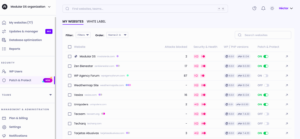
Lastly, in Modular DS 3.0, we added malware scanning through a new integration with Imunify Connect, developed by CloudLinux, the company behind the most widely used security and stability solutions for web hosting. It automatically checks your WordPress sites’ files and database for malicious or compromised content, complementing the Patchstack integration: prevention on one side, detection on the other.
All without needing a separate plugin or external tool.
A new level of control with smart updates
Managing updates across multiple client sites has always been one of the most demanding parts of the maintenance job, so in February, we introduced a new approach.
Until now, automating WordPress updates in site management tools meant picking a schedule and letting it run. What we shipped goes further, with a conditional automation system that lets you define not just when updates run, but under what circumstances. This is what we call smart automation rules.
For example, you can configure updates to run only for minor releases, only when the Update Copilot risk score is above a threshold, or to trigger immediately if a vulnerability is discovered, without waiting for the next scheduled window.
And that’s not all. You also control how those automated updates run: as a safe update (with visual checks and rollback) or as a standard quick update.
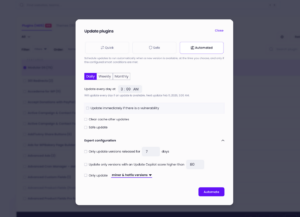
💡 For a full breakdown of the update modes available, the Modular DS updater documentation covers each one in detail.
For situations that fall outside a recurring schedule, there’s also one-time update scheduling. You pick the date and time, the update runs, and that’s it.
Migrations, staging, and managing sites at scale
April’s release brought some of the most requested features of our public roadmap.
You can now migrate or duplicate any site in three ways: move its content to another existing site in Modular DS, migrate to a different server while keeping the same domain, or clone it to a new domain. If you work from a template site for new client projects, that last option alone is a significant time saver.
On top of all this, staging environments let you create a testing site on your own server, run your changes, and push to production when you’re ready.
Lastly, backup restoration got simpler in the same release, now working in one click through the Modular Connector plugin.
Modular DS 3.0 extended all of this with bulk site import, new data regions, and global management screens covering backups, uptime monitoring, malware scans, and broken link checks across all your sites at a glance.
Better uptime monitoring and broken link checker
The uptime monitor has been part of Modular DS since early on, and a few months ago, it got a meaningful upgrade. The new improvements and features include:
- More reliable downtime detection, so you get accurate information about your sites’ availability without unnecessary noise.
- Detailed check logs so that, when a site goes down, you can see more details on what happened and why.
- Real-time uptime stats that you can filter by date.
- Downtime alerts in Slack and Discord, in addition to email and WhatsApp.
- Improved email alerts, including the reason for the downtime.
- Detailed SSL certificate information.
- More flexible monitoring configuration.
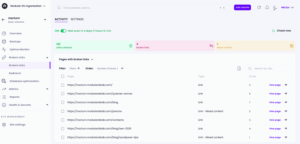
More recently, version 3.0 also brought a broken link checker to the platform.
You can run scheduled or manual scans on any of your sites to find broken links and images, and when broken internal links are found, fix them by creating redirects without leaving Modular DS.
Reporting and the work of selling maintenance
One of our releases in March addressed something that often gets less attention than technical features: making maintenance visible and easier to sell.
Pre-maintenance reports give you an easy way to show potential clients everything their site needs addressed: pending updates, detected vulnerabilities, performance issues, database optimizations, etc. As well as any additional tasks you want to include.
They’re useful for proposals, for convincing existing clients who aren’t yet on a care plan, and for anyone who needs to see why maintenance matters.
All the options in pre-maintenance reports are also available in regular scheduled reports, including which updated plugins had vulnerabilities, what critical issues were addressed, and what’s still pending.
Other improvements worth mentioning
With these releases, we also shipped a handful of other minor improvements worth highlighting, including:
- Per-site white label settings (Business and Enterprise plans), so you can configure the Modular Connector plugin under your own branding individually for each site.
- Abandoned plugin detection. If a plugin hasn’t been updated in a long time or has been closed in the WordPress repository, you’ll see a warning in the global updater. A small thing that can save you from bigger security issues down the line.
- Hide critical health and security errors from your Modular DS dashboard. Useful for issues you’ve already got under control or have consciously decided not to fix.
What’s next
This post covers the most significant updates we’ve shipped since the beginning of the year, but each release has its own post with more detail:
- May 2026: Modular DS 3.0: Our biggest release of the year
- April 2026: Migrate, clone, and create WordPress staging sites
- March 2026:
- February 2026: Scheduled and smart automated updates
There’s more coming in the months ahead, and we’ll keep sharing updates here as they take shape. In the meantime, if you’re already using any of the new features, let us know how they’re working for you.
If you’re heading to WordCamp Europe 2026 this week, that’s a great opportunity to do it in person 🙂
We’re sponsoring again this year and part of our team will be there, so we’d love to meet you at our booth, whether you’re already using Modular DS or you’re just curious about what it can do for your maintenance business.

Stay in the loop