New in Modular DS: Scheduled and smart automated updates
When you manage multiple WordPress websites, keeping everything up to date can quickly become one of the most demanding parts of your day-to-day work, both in time and mental energy.
At Modular DS, we’ve been recently thinking a lot about this: how to help you simplify the update process without losing control over what’s happening on your clients’ sites.
Today, we’re taking an important step in that direction.
Table of contents
A new way to update your WordPress sites
With this release, we’re introducing a new, powerful way to manage your WordPress updates, with capabilities that didn’t exist before in this type of site management tool.
Our goal? To help you automate and schedule updates more thoughtfully, reducing unnecessary risks.
Let’s take a look at what’s new.
Automate updates with smart conditions
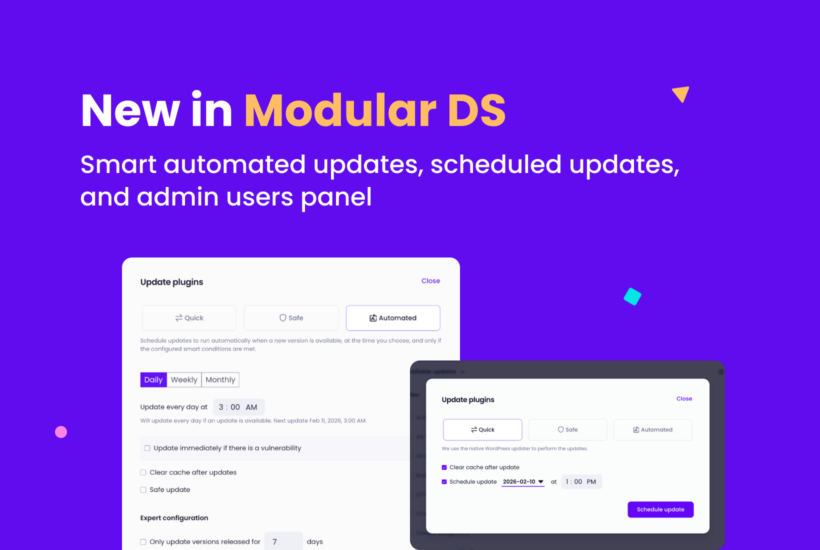
In addition to choosing when plugin, theme, and WordPress core updates should run (e.g., every Monday at 8:00 AM), you can set smart rules so they only happen when certain conditions are met.
For example:
- The version has been available for more than X days.
- It’s a minor release.
- The Update Copilot risk score is above X.
- If a vulnerability is discovered, it triggers an immediate update instead of waiting for the scheduled date.
And that’s not all. You can also decide how automated updates are performed:
- As a safe update, with visual checks and manual or automatic rollbacks.
- As a quick update (standard).
- With or without cache clearing.
You set the rules. Modular DS takes care of the rest.
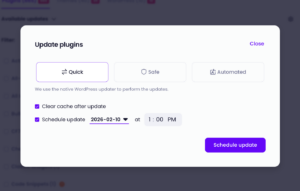
Schedule one-time updates
Sometimes you have a pending update, but it’s just not the right moment, or you simply want to handle it later.
With Modular DS, you can now schedule a one-time update to run on the exact date and time you choose, without it becoming part of a recurring automation.
Think of it like scheduling an email to be sent later, instead of sending it right away.
The Modular DS global updater, explained
Here’s a complete walkthrough of the Modular DS updater and all the possibilities it unlocks, including the latest features.
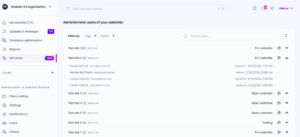
New admin users panel
This release also introduces a new admin users panel designed to give you better visibility and control over who has access to your WordPress sites.
At a glance, you can see:
- All users with an administrator role on each site.
- Admin users deleted in the last 7 days.
On top of that, we recently released new administrator change alerts that notify you whenever an admin user is added or removed on any connected site.
A simple and effective way to monitor access across all your websites and quickly spot suspicious changes or potential security issues.
What’s next
All these improvements are now available in Modular DS, across all plans.
As always, we’d love to hear what you think. And stay tuned, this release is just another step in how we’re making it easier to manage your WordPress sites.
More updates coming soon 😉
New to Modular DS? Try it for free and see how it can help you.

Stay in the loop