More vulnerabilities, exploited faster: how to protect your clients’ sites in 2026

Over the last few months, vulnerabilities have been found in some of the most popular WordPress plugins, in WordPress core itself, and last week, in PHP, the language that powers nearly 70% of all websites.
A big part of this, of course, comes down to artificial intelligence. With everything it makes possible today, more vulnerabilities are being found than ever, and, just as importantly, they’re being exploited faster.
And yes, it’s natural to be worried. We’ve been getting a steady stream of questions about it from our users lately, and there’s no shortage of opinions on blogs and social media. That’s why I wanted to write this post, with help from the Modular DS technical team.
We’ll look at what’s happening, what we’re seeing at Modular DS, what it means for the way you manage your sites, what we’re doing to help you protect them, and why security deserves an even bigger role in your service right now.
If you maintain WordPress sites for clients, this is relevant to you, whether or not you use Modular DS. It’s a long post, but I think it’s worth your time.
Table of contents
Why I’m writing this
We’ve been building Modular DS since 2021, talking every week with agencies, freelancers, and hosting companies that manage websites. Before that, we spent many years maintaining our own clients’ sites. Nothing we’ve seen comes close to what’s been happening over the past few weeks. And I’m pretty sure we’re not the only ones who feel this way.
We’re not talking about a handful of isolated vulnerabilities. This is a trend, and it’s changing what it means to maintain a website.
I’m not trying to scare anyone here. I just want you to understand how this affects you and what you can do to protect the sites you’re responsible for.
This post won’t cover the basics (strong passwords, two-factor authentication, giving users only the access they need). If you want a refresher, check out our WordPress security guide. This is about what matters day-to-day when you’re maintaining sites.
What’s happening
Since July alone, serious vulnerabilities have been found in several of those plugins you’ll find on almost any site, as well as in WordPress core and in PHP.
These are some of the most significant cases:
| Date | Software | What happened |
|---|---|---|
| October 2026 | PHP (PHP2Shell) | Two critical remote code execution flaws in PHP core. Only supported versions (8.2 and above) received official patches. They affect close to 70% of the internet. |
| October 2026 | Duplicator and Duplicator Pro | Unauthenticated PHP object injection, rated 9.8 out of 10, in a plugin with over 1 million installs. |
| October 2026 | UpdraftPlus (UpdraftCentral) | Attackers stole the keys to UpdraftCentral, the remote management service for UpdraftPlus, a plugin with over 4 million installs. They used them to install backdoors on connected sites. |
| October 2026 | Rank Math SEO PRO | Supply chain attack. Some of the packages for version 3.0.123 shipped with malware, backdoors, and unauthorized admin accounts. |
| September 2026 | WordPress core (CVE-2026-87902) | Unauthenticated local file inclusion that can lead to code execution on certain server configurations. Rated 9.2 out of 10, with mass exploitation attempts. |
| August 2026 | Elementor Pro | Unauthenticated file upload that allows code execution on the server, in a plugin installed on millions of sites. Exploitation began the same day the patch was released. |
| July 2026 | WordPress core (wp2shell) | The first critical unauthenticated remote code execution in core in nearly a decade. Exploited within hours of the patch. |
Look closely at the table and you’ll see three patterns.
1. The window between patch and attack has all but closed. With Elementor Pro and wp2shell, attacks started the same day the patch came out. PHP2Shell was even worse. The details leaked the day before the official disclosure, and exploitation attempts were already being recorded hours before the patch was released. Updating once a month doesn’t protect anyone anymore.
2. Updating isn’t always enough. With Rank Math SEO PRO, the update itself was what infected sites: the people who updated quickly were exactly the ones who got the malware. With UpdraftCentral, the problem wasn’t in the code but in stolen keys, so no update could stop the attack. In cases like these, the only thing that works is detecting what’s already inside.
3. Any system can be vulnerable, even the most widely used or basic tools. Backup, migration, SEO, and page builder plugins. The kind of plugins you install once and forget about, and that have access to everything. In fact, two of the four plugins in the table above are backup plugins.
None of this means these plugins can’t be trusted or that WordPress is insecure. These are solid projects maintained by serious teams. Many of these vulnerabilities probably wouldn’t have been found without AI (the PHP vulnerability had been there for more than 10 years without anyone noticing it).
More and more, I hear developers say: “It’s not a question of if it’ll happen to us, but when.“
We had a critical flaw discovered in our own Modular DS plugin last January. What did we do? We released a patch in 82 minutes, updated all sites running our plugin, and shared everything in this post-mortem.
In our view, those are exactly the two things that matter most in these situations: speed of response and transparency.
And it’s the same proactive approach you should take with your clients.
The role of AI
As I mentioned before, AI has changed the rules. Today, more people and more tools are looking for vulnerabilities, and that’s a good thing. Flaws that used to go undetected for years are being found and fixed, and the software we use is getting more secure.
But attackers use the same tools. They analyze a patch, figure out what it fixes and how to exploit it, and launch mass attacks within hours.
More vulnerabilities, found faster and exploited faster. That’s the new reality.
Is WordPress the problem?
No. Actually, read that again. No.
After reading all of this, it’s natural to wonder. But I think what’s happened over the last few months proves exactly the opposite.
Finding so many vulnerabilities in WordPress doesn’t make it less secure. Quite the opposite. Thanks to its popularity, its community and contributors, the many businesses built on it, and specialized security firms like Patchstack and Wordfence, WordPress is under constant scrutiny, and the vulnerabilities that turn up get fixed efficiently.
That’s one of the strengths of open source. Vulnerabilities get found, they get fixed fast, and you hear about them. With wp2shell, for example, WordPress forced automatic updates on affected sites the same day it released the patch.
Beyond reacting quickly, WordPress is also trying to get ahead of the problem. In June, it launched Protect The Shire, an initiative to make the 78,000+ plugins and themes in its repository more secure. Among other measures, every new release now waits 6 hours before reaching sites and, in the meantime, AI models analyze it for malicious code or vulnerabilities. If the risk is high, the release is automatically blocked until it’s fixed.
And of course, vulnerabilities aren’t exclusive to WordPress. The difference is whether someone is looking for them and whether you find out when they show up. Websites and apps built with AI are a good example. A study published this year audited 200 apps built with AI agents and found at least one vulnerability in 91% of them. Two out of three flaws were critical or high severity. And in an app like that, nobody else reviews the code. There’s no security advisory, no patch, and no one to warn you. If it has a flaw, chances are the first person to find it will be the one exploiting it.
That’s not to say WordPress doesn’t have its challenges. Its greatest strength, the huge ecosystem of plugins and themes, is also its weak spot. They’re not all equally well maintained, and every one you install is one more thing to keep an eye on (be especially careful with custom plugins built with AI or installed from outside the official repository, because nobody is reviewing their code). That’s why maintenance matters so much. The system works when someone applies patches on time, reviews what’s installed, and keeps an eye on what’s happening on each site. And that someone is you.
What about PHP?
Something similar happened with PHP2Shell. Voices quickly popped up saying it no longer makes sense to use PHP. But in those same few days, serious flaws were disclosed in plenty of other technologies.
Node.js fixed 10 vulnerabilities, including a high-severity one that could allow code execution. GitLab patched one with the maximum severity rating, 10 out of 10, affecting versions released over the last 12 years. Java fixed another, rated 9.1 out of 10, in the component that handles its encrypted connections. And seven out of ten HTTP/3 implementations tested were vulnerable to attacks that can run a server out of memory. On top of that, F5 released urgent updates for three critical vulnerabilities in NGINX, one of the most widely used web servers. We could go on with LiteLLM and Railway, both popular in vibe coding, but you get the point.
I’ll say it again: there’s no language or technology without flaws. What protects a website is running supported versions and updating on time, whether it’s WordPress, PHP, Node.js, or anything else.
What we’re seeing at Modular DS
We don’t just read about all this in the news. We see it every day across the more than 40,000 sites that our users manage with Modular DS and the data confirms the trend.
Vulnerabilities and hacks are on the rise:
- New vulnerabilities have increased sixfold in five months. In April, we were detecting an average of 1.2 new vulnerabilities per site per month. By August, it was 3, and in September, 7.5. And nothing suggests it’s going to slow down.
- 1 in 10 malware scans finds something. And these are sites connected to a maintenance tool, not forgotten ones.
- Every day, we see around 25 sites with new admin accounts that don’t look legitimate. That’s more than 150 a week. Many of them are repeat cases.
- Sites with Patch & Protect block an average of 80 attack attempts a week. Every single one is an attempt to exploit a known vulnerability.
Many sites are making it easy for attackers:
- More than half of the sites connected to Modular DS currently have at least one vulnerability in one of their plugins.
- 11% are still running a PHP version older than 8.2, down from 17.5% a week ago. That means no official support and no security updates. And PHP 8.2 itself, used by another 19%, reaches end of life on December 31.
- 17% have at least one abandoned plugin: one that hasn’t been updated in more than two years or has been closed in the WordPress repository. If a flaw is discovered in it, nobody is going to fix it.
The good news is that all three can be solved through maintenance: applying updates immediately when there’s a vulnerability, moving sites to a supported PHP version, and replacing abandoned plugins.
What this means for your maintenance service and how Modular DS can help
Maintenance can no longer be about updating once a month and having a backup. It has to be a proactive system that spots security issues early and responds within hours, not weeks.
If you offer maintenance to clients, whether you’re an agency, a freelancer, or a hosting company, that system rests on three pillars: prevention, detection, and cleanup.
Prevention: catch risks early and act fast
The first step is knowing when one of your sites is vulnerable. You need a way to detect vulnerabilities and get alerts as soon as they’re disclosed.
You can check public databases like Patchstack’s, use free plugins like WPVulnerability on each site, or handle it from a single dashboard for all your sites with a tool like Modular DS. Beyond showing you vulnerabilities in plugins, themes, WordPress versions, PHP, and databases, it lets you enable instant notifications so you’re alerted the moment they’re published.
When the alert comes in, you need to respond fast. If there’s an official patch, the recommendation is to apply it immediately (update). If there isn’t one yet, or you can’t update, you need something that keeps the vulnerability from being exploited in the meantime.
In both cases, Modular DS can help with:
- Smart automated updates: set up rules so that as soon as an update fixing a vulnerability is released (for plugins, themes, or WordPress core), your sites update immediately, even if it’s Saturday night and you’re on vacation.
- Patch & Protect: our security add-on built with Patchstack. It applies virtual patches to most known WordPress vulnerabilities so they can’t be exploited on your sites until there’s a fix available or you’re able to update. It also includes security hardening rules. It costs $2.25/month per site, and it’s definitely worth it, especially on your most critical sites.
Detection: spot the intrusion before your client does
Some malware gets into a site and takes a long time to show any signs. Nothing visibly breaks, but it’s there, and then suddenly, it shows up.
The sooner you catch it, the less damage it does. That’s why it’s important to scan your sites regularly, especially after every critical alert or round of updates.
For that, you need a malware scanner. It can work at the server level, like the ones many hosts offer (Imunify360 or ImunifyAV, for example), or at the site level, with plugins like Wordfence.
With Modular DS, you can turn on regular scans through our Imunify integration. All plans include a monthly scan per site. For critical sites, we also recommend enabling the Imunify PRO add-on to get daily and on-demand scans.
On top of that, there’s another signal you shouldn’t lose sight of: admin users.
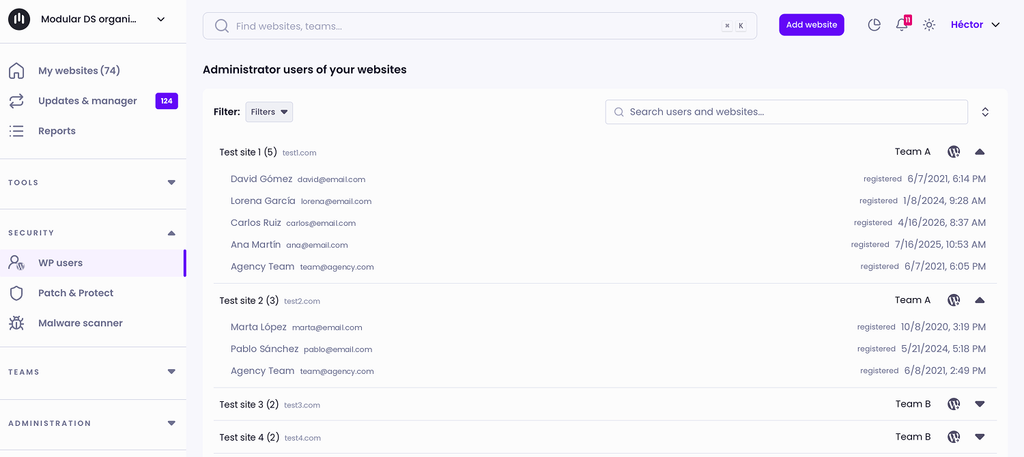
A new admin account nobody recognizes is often the first sign of a hack. That’s what happened in several of the incidents mentioned above, and it’s a pattern we see every day:
- An admin user is created.
- A malicious plugin is installed, or a legitimate plugin is rolled back to an older, vulnerable version.
- A backdoor is hidden in another legitimate plugin, different from the one behind the initial hack.
- Even if the user and the malicious or vulnerable plugin are removed, the backdoor is still there and remains an open door for attackers.
Check your sites’ admin users regularly, or let Modular DS’s automatic detection alert you as soon as a new one shows up.
Cleanup: have a plan before you need it
Even if you do everything right, a site can still get infected. And when it does, you don’t want to be improvising. Know who handles the cleanup, what tools you’ll use, and how you’ll communicate it to the client.
If you don’t have experience cleaning up malware, have a trusted specialist you can call.
Also, as I’ll explain below, you’ll soon be able to clean up detected malware directly from Modular DS.
What’s new and what’s coming to Modular DS
Everything we’ve seen over these months has led us to adjust our end-of-year roadmap and prioritize a few changes we already had in mind.
If security is a core part of the maintenance you offer, it should be a core part of the tools you rely on to deliver it too. Today, we’re more convinced of it than ever.
Here are the most important updates, some already live on the platform and some coming soon:
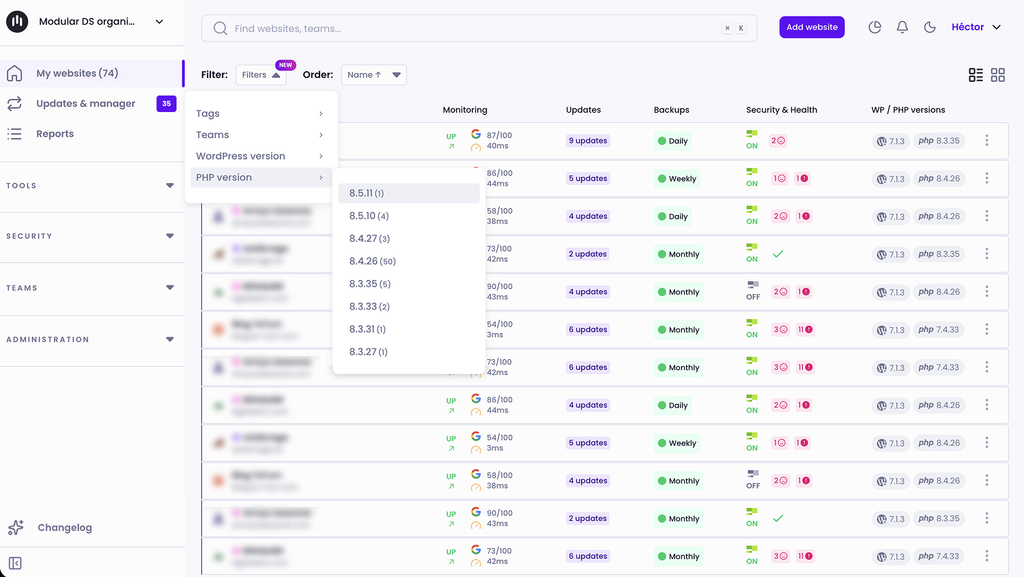
New PHP version filter
On October 21, when the PHP2Shell vulnerability was made public, we added PHP version and WordPress version filters to the dashboard, so our users could quickly see which sites were running unsupported versions and would no longer receive official patches.
From detecting admins to managing them
Today, Modular DS alerts you when a new admin user is added to a website. That’s often the first sign of a compromised site.
Very soon, you’ll also be able to act on it from the same dashboard: remove an admin that’s slipped into on one or more sites, edit it, or revoke its permissions, without logging into each WordPress install.
Malware cleanup, right from your dashboard
As we’ve seen, preventing and detecting malware is only part of the job. Sometimes, an infection is simply unavoidable, and cleanup is the part that eats up the most hours when it happens. That’s why we’re adding malware removal through our Imunify integration.
In practice, this means that when the scanner finds malicious code, it’ll be able to clean it up for you. Fewer hours of manual cleanup for you and less time with a compromised site for your client.
Minimum PHP version: 8.2
We’re considering making PHP 8.2 or higher a requirement for Modular DS. We know there are many sites below that version (11% of sites connected to the platform right now), but continuing to support them would mean helping them stay exposed.
PHP 7.4 has been unsupported since November 2022 (four years), PHP 8.0 since November 2023, and PHP 8.1 since December 31, 2025. None of them received the official PHP2Shell patch.
The change would most likely come with a new version of our plugin that could only be installed on sites running PHP 8.2 or higher. Other sites could stay connected to Modular DS, but they’d lose access to new features and improvements. They would still get security patches, though, if needed.
How to sell security to your clients
Stepping up security requires time and the right tools, but it’s also one of the strongest arguments for selling your maintenance service and reviewing your pricing.
Your clients need this protection, and many of them have already heard about hacked sites and large-scale attacks, even if they don’t fully understand what’s going on.
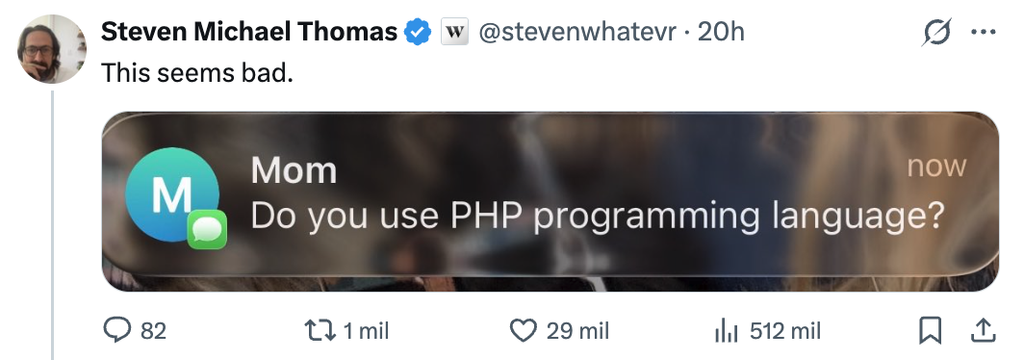
This post on X sums it up perfectly:
Add a security tier to your maintenance plans
If you only sell one basic WordPress maintenance plan today, consider adding a second one focused on security, at a higher price and with more value for your clients:
| Includes | Basic plan | Security plan |
|---|---|---|
| Plugin, theme, and core updates | Yes | Yes |
| Backups | Yes | Yes, off-server and with tested restores |
| Vulnerability monitoring | Occasional checks | Yes, critical issues fixed within 24 hours |
| Virtual patching | No | Yes |
| Malware scanning | No | Yes, regular scans |
| Admin user monitoring | No | Yes |
| Malware cleanup | Billed separately | Included |
WordPress management tools like Modular DS or security add-ons like Patch & Protect add to your costs, but they’re also what justify the price difference. You’re not selling “one more plugin.” You’re selling your clients peace of mind, knowing their website will keep working.
And with Modular DS reports, you can show them every vulnerability patched, every attack blocked, and every piece of malware found and cleaned up.
If you already have maintenance clients
It’s a good time to review your pricing or move clients to the security plan.
Explain what’s changing in the service, not just what it costs. Use real examples, like the ones in this post. And give them plenty of notice so there are no surprises.
If you have clients without a maintenance plan
Many clients think their site is “done” once it’s live. Show them how the cost of a year of maintenance stacks up against the cost of cleaning up a hacked site, recovering lost rankings, or explaining to their own customers that their data was exposed. A site without maintenance isn’t a finished site. It’s an exposed one.
Use Modular DS pre-maintenance reports to show them the issues or pending updates on their site, especially security-related ones, and help them understand why they need the service.
Talk business, not fear
Skip the scare tactics. Your client doesn’t care what SQL injection is. They care that their online store keeps selling, their contact forms keep bringing in leads, and Google doesn’t flag their site as dangerous. Frame your maintenance pitch in those terms.
Where to start this week
If you’re only going to do three things after reading this, here’s what I’d recommend:
- Filter your managed WordPress sites by PHP version and make a note of the ones running 8.1 or older. They’re exposed and aren’t getting security updates (although many hosting companies applied patches this time). You might also add sites on 8.2, which reaches end of life at the end of the year.
- Consider enabling services like Patch & Protect or malware scanning to strengthen your sites’ security, at least on the most critical ones.
- Talk to your clients, if needed, about moving to a security plan. Explain what’s changed, what risks their site faces right now, and how better protection keeps their business running. The price increase should be part of that conversation, but not the headline.
Security has always been an essential part of maintenance. What’s changed is the speed. Agencies that adapt will protect their clients better, offer a more valuable service, and avoid a lot of headaches.
At Modular DS, we’ll keep working alongside you to make your job easier.
If you have questions, need a hand setting things up, or would like to enable any of the security add-ons across a large number of sites, email us at [email protected]. We’ll be happy to help.
Stay in the loop