Modular DS & Patchstack Webinar: Recap and Q&A
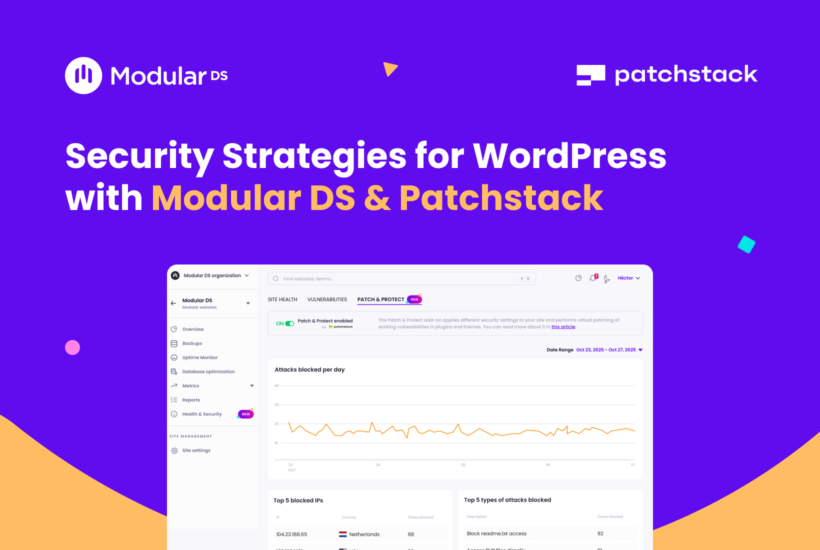
On February 17, we hosted a live session with Patchstack to share practical security insights for WordPress professionals, walk through our Patch & Protect add-on, and show the latest updates to our integration.
If you missed the session or couldn’t attend live, no worries. Here are the main takeaways, the Q&A, and the recording.
Table of contents
Recording: Security Strategies for WordPress with Modular DS & Patchstack
Key takeaways from the session
The vulnerability landscape is growing. Nearly 8,000 vulnerabilities were discovered in the WordPress ecosystem in 2024, and about 33% weren’t patched in time. The 2026 State of WordPress Security report is coming soon, but the trend has no signs of slowing down. With more plugins being submitted (and AI accelerating development), the attack surface keeps growing.
Security works in layers. You typically have a network layer (firewalls, bot blocking), a server layer (hosting-level protections, file monitoring), and the application layer (WordPress layer). Some call it the Swiss cheese model. Others call it a layer cake. Salty or sweet, the idea is the same: no single layer is perfect, but together, they reduce risk.
Patch & Protect “speaks” WordPress. Generic security tools protect at the network or server layers, but they don’t fully understand WordPress context, where most vulnerabilities actually live. Plugins, themes, permission logic, etc. That’s where the Patch & Protect add-on, developed by Patchstack, steps in.
Hosting security is not the same as vulnerability protection. Patchstack tested 18 hosting providers against 30 known vulnerabilities. In 74% of cases, attacks still succeeded and were exploitable. This doesn’t mean hosts are “bad.” They protect infrastructure, but plugin-level vulnerabilities are usually outside what hosting security mitigates.
Virtual patching matters. Through virtual patching, Patch & Protect blocks exploit attempts at the application level, even if the vulnerable code is still present and no official patch exists yet. Nothing is modified in the original plugin or website code. It applies targeted mitigation rules only when needed, reducing urgency and buying you time to update.
Security as a strategic differentiator. Clients may not understand caching layers, but they understand risk and what a hacked website means for their business. Framing website maintenance as proactive risk management and reduction is easier to justify and price properly.
If you can’t see vulnerabilities or exposure levels, you’re managing risk blindly. And it’s hard to communicate value to your clients when you don’t have visibility. Centralized monitoring through Modular DS changes that, helping you show active protection, report blocked attacks, reduce emergencies, and increase trust.
New Patch & Protect features in Modular DS
During the live session, we also showed the latest updates to Patch & Protect, including:
- A new global Patch & Protect dashboard with basic security information for all your connected sites and the ability to activate or deactivate the add-on in bulk.
- Per-site security settings management: You can manage the hardening rules applied by Patchstack directly from Modular DS. For each site, and without switching platforms, making it easier to adapt security settings to different client needs.
- White-label support: We also showed how Patch & Protect data can be included in client reports under your own brand.
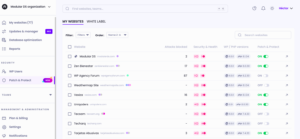
These improvements will be part of our next release, but if you’re already using Patch & Protect and want early access, just reach out and we’ll enable it for you.
Webinar Q&A
What’s the main difference between Patchstack inside Modular DS and the stand-alone Patchstack solution?
The protection is essentially the same. The main difference is the context: in Modular DS you get Patchstack inside your WordPress maintenance workflow. That also means more flexibility if you’re already managing sites in Modular DS, plus you can include security insights in your client reports alongside metrics like Analytics and Search Console.
Does Patch & Protect include malware removal if I’ve already been hacked?
No. Patch & Protect is focused on prevention (blocking exploit attempts and reducing risk while vulnerabilities exist). If a site is already compromised, you still need a cleanup or remediation process. This is why we recommend enabling Patch & Protect as soon as the site goes live.
What’s the difference between the Patchstack vulnerability info I see and the paid add-on through Modular DS?
In Modular DS, vulnerability detection and notifications are included across all plans. If a plugin, theme, or WordPress core version has a known vulnerability, you’ll see Patchstack’s data and the link to the vulnerability details directly in our platform, up to 48 hours before it’s publicly disclosed.
Patch & Protect, the paid add-on, is about the protection layer (mitigation through virtual patching and hardening rules). It’s available per site, and you can activate it from your Modular DS dashboard.
How does Patchstack complement tools like Cloudflare?
They work at different layers. Cloudflare is primarily a network-level solution that blocks generic threats. Patchstack operates at the application layer, with WordPress-specific context (permissions, plugin behavior, exploit patterns) that a network WAF typically can’t see. For that reason, it can reduce false positives compared to generic WAF rules. Using both is recommended because they cover different attack vectors.
If I subscribe through Modular DS, do I also get access to the Patchstack dashboard?
The Patch & Protect add-on in Modular DS isn’t connected to an existing Patchstack account. Instead, you get a dedicated page so you can configure most of the same options you’d manage in Patchstack.
Does Patch & Protect detect vulnerabilities in custom themes?
Not at the moment. Vulnerabilities need to be discovered and registered (published), and custom code used by very few sites often doesn’t get that visibility.
Does Patchstack collect personal data (e.g., IP addresses)? What about GDPR?
Patchstack collects attacker IP addresses in the threat log (so you can block abusive sources), but it’s handled with GDPR considerations in mind.
What’s the difference between Patchstack/Patch & Protect and Wordfence?
Wordfence is strong on reactive measures like malware scanning, while Patchstack is more proactive for vulnerability protection and mitigation rules, with the largest vulnerability database in the WordPress ecosystem.
Does Patch & Protect block user IPs, or does it modify plugin code?
It doesn’t modify plugin code. It blocks exploit attempts (including IP-based blocking) when it detects behavior associated with known vulnerabilities.
For which websites is Patch & Protect most important?
Ideally, all sites. But if you need to prioritize, start with sites you can’t update quickly (complex setups, high risk of breaking changes) and sites you’ve just inherited from clients (unknown plugin stack, not yet audited). It’s also especially useful for sites where removing or updating a vulnerable plugin isn’t immediately feasible.
If my host uses Patchstack, do I still need the Patch & Protect add-on?
It depends on what the host provides. Some hosts only send vulnerability notifications but don’t offer real-time protection, then you’d still want Patch & Protect. If the host also includes the add-on and it’s activated, you may not need it separately. Here’s a practical check: if there’s no Patchstack plugin installed on the site, you likely don’t have protection enabled.
Does Modular DS offer an annual plan for the Patch & Protect add-on?
Modular DS plans can be annual, but the Patch & Protect add-on is monthly only. It’s priced per site, and since you may want to activate or deactivate protection on different sites over time, monthly billing gives more flexibility.
My site management tool says it includes vulnerability alerts, does that mean it includes Patchstack?
Not necessarily. It’s always recommended to ask or check where the vulnerability data comes from. If alerts come from general or public sources (e.g., CVE), there can be delays, sometimes too late once exploits are disclosed.
Timing matters because attacks ramp up quickly once a vulnerability becomes public. With Modular DS, you can get early notifications that give you up to 48 hours’ head start before public disclosure, so you have more time to act and reduce the risk of being hacked.
Ready to strengthen your WordPress security?
If you’re responsible for multiple WordPress sites, reducing exposure time becomes increasingly important as vulnerabilities keep growing.
Patch & Protect adds real-time protection and helps you turn security into something visible and valuable for your clients. It’s available as an add-on for $2.25 per site/month and can be activated anytime from your Modular DS dashboard.

Stay in the loop